I'm Ahmed Kacem.
Software Engineering Student.
A DevOps/Cloud engineer with a deep interest in
- Currently specializing in DevOps & Automations
- Cloud-Native & Kubernetes Infrastructure
About Me
I'm a software engineering student based in Sousse, Tunisia, studying at the Higher Institute of Computer Science and Mathematics of Monastir. My work is focused on infrastructure and automation, building systems that are reproducible, observable, and built to scale.
My approach is simple: good architecture should be destroyable and recreatable without a single human having to intervene. Automation isn't a nice-to-have, it's the whole point. If a system can't rebuild itself, it isn't finished yet.
Outside of tech, I'm someone who fixes things. Whether that's finding hardware problems or digging into my OS config because something isn't behaving the way I want, I don't leave problems alone until I understand them. That same instinct is what drives how I work.

Statistics
Computing contributions...
Technologies
Languages
 Go (Golang)
 Python
Frameworks
 Flask
Flask
 Celery
Infrastructure & Cloud
 Terraform
 Ansible
 Azure
Azure
Containers, Orchestration & GitOps
 Docker
 Trivy
Trivy
 Kubernetes
 Helm
Helm
 Argo CD
CI/CD & Observability
 Jenkins
 Prometheus
 Grafana
 Loki
Loki
Projects

mgit
A powerful CLI tool written in Go designed to manage and execute commands across multiple Git repositories simultaneously. It streamlines multi-repo workflows, saving time and context-switching for developers dealing with microservices or distributed codebases.
mgit - Multi-Repository Git Management Tool
mgit is a command-line tool for managing and executing commands across multiple Git repositories simultaneously.
Download
Download the latest version from the Releases page.
Install on Linux
App Binary
chmod +x mgit
sudo mv mgit /usr/local/bin/mgit
Shell Completion
Bash/Zsh/Fish (Linux)
sudo mv <mgit_completion> /etc/bash_completion.d/<mgit_completion>
source /etc/bash_completion.d/<mgit_completion>
Install on MacOS
App Binary
chmod +x mgit
sudo mv mgit /usr/local/bin/mgit
Shell Completion
Zsh (macOS)
mkdir -p ~/.zsh/completions
mv <_mgit> ~/.zsh/completions/
echo 'fpath+=~/.zsh/completions' >> ~/.zshrc
autoload -Uz compinit && compinit
Install on Windows
App Binary
Move-Item mgit.exe "$env:USERPROFILE\bin\mgit.exe"
# Ensure $env:USERPROFILE\bin is in your PATH
Shell Completion
PowerShell temporary use
go run ./ completion powershell > mgit_completion.ps1

. .\mgit_completion.ps1 # for temporary use
Build from source (requires Go to be installed)
Build Binaries
Linux/macOS
cd mgit
go build -o mgit
chmod +x mgit
sudo mv mgit /usr/local/bin/mgit
Windows (PowerShell or CMD)
cd mgit
go build -o mgit.exe
Move-Item mgit.exe "$env:USERPROFILE\bin\mgit.exe"
# Ensure $env:USERPROFILE\bin is in your PATH
Completion
bash
mgit completion bash > mgit_completion.bash
zsh
mgit completion zsh > mgit_completion.zsh
fish
mgit completion fish > mgit_completion.fish
powershell
mgit completion powershell > mgit_completion.ps1
Usage
Add repositories/projects
# Add a new repository to current project
mgit add repo --path <full-path> #name of the repository is automatically sourced from the end of the path

mgit add repo --path <full-path> --name custom-name

# Add a new project
mgit add project --name <project-name>
Delete repositories/projects
# Delete a repository from current project
mgit delete repo <repo-name>

# Delete a project
mgit delete project <project-name>
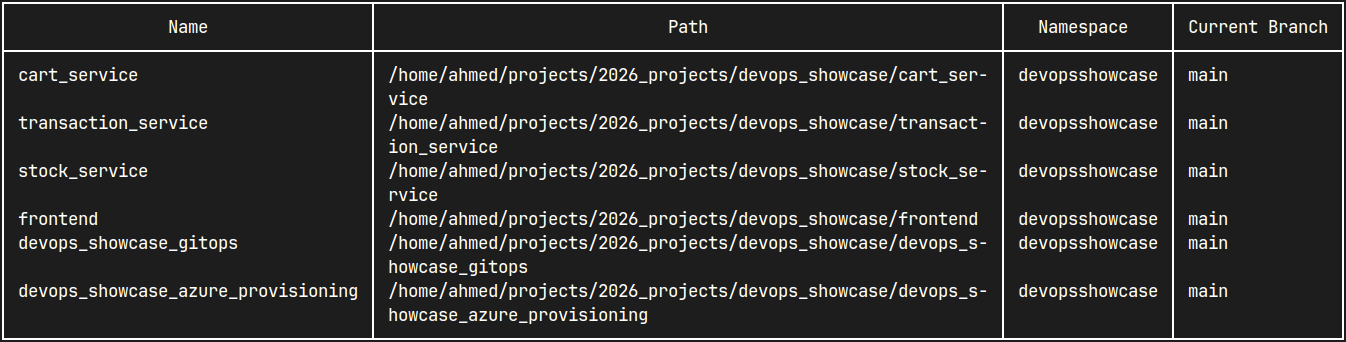
List repositories
# List repositories in current project
mgit list

# List repositories in a sepecified project
mgit list --project name

# List repositories in all projects
mgit list --all
Switch between projects
mgit switch <project-name>
Execute commands on repositories
mgit exec repo1 repo2 repo3 -- command
mgit exec -- command
Examples
- Add repositories to your workspace:
mgit add repo --path /home/username/projects/project1 mgit add repo -p /home/username/projects/project2 - Create and switch to a new project:
mgit add project work-projects mgit switch work-projects - Check status of specific repositories:
mgit exec project1 project2 -- git status - Pull latest changes from all repositories in current project:
mgit -- git pull - List all tracked repositories across projects:
mgit list --all
Configuration
mgit uses a SQLite database to store your repository information and projects. The database is automatically created at ~/.mgit as db.sqlite on first run.
It also keeps track of the current project in ~/.mgit/config.json
Contributing
Contributions are welcome! Please open an issue or submit a pull request for any improvements or bug fixes.
License
This project is licensed under the Apache-2.0 License - see the LICENSE file for details.

devops_showcase
A cloud-native microservices e-commerce platform deployed on Azure Kubernetes using Terraform, Jenkins CI/CD, and ArgoCD GitOps workflows with full-stack monitoring.
DevOps Showcase
Architecture Overview
Microservices
Technologies: Python, Flask, MongoEngine, Celery, Redis.
Technologies used in Jenkins pipeline: Docker, Trivy, Azure Container Registry
| Name | Repository | What it is for |
|---|---|---|
| Cart Service | devops_showcase_cart_service | Manages carts, cart items, and checkout state. |
| Stock Service | devops_showcase_stock_service | Manages products and inventory operations. |
| Transaction Service | devops_showcase_transaction_service | Manages transaction creation and transaction status updates. |
These microservices communicate with each other using Celery tasks over Redis queues.
Frontend
| Name | Repository | What it is for | Technologies |
|---|---|---|---|
| Frontend | devops_showcase_frontend | User-facing web application that drives the full flow across services. | TypeScript, React, Next.js,Jenkins (pipeline contains: Docker, Trivy, Azure Container Registry) |
GitOps
| Name | Repository | What it is for | Technologies |
|---|---|---|---|
| GitOps | devops_showcase_gitops | Contains Kubernetes bootstrap and deployment manifests/charts. | Kubernetes, Helm, Argo CD, Argo Rollouts, Traefik, cert-manager, Prometheus, Grafana, Loki, Grafana Alloy |
Provisioning
| Name | Repository | What it is for | Technologies |
|---|---|---|---|
| Azure Provisioning | devops_showcase_azure_provisioning | Contains Terraform and Ansible automation for infrastructure provisioning and Jenkins setup. | Azure, Terraform, Ansible, Ansible Vault, Jenkins, Docker, Azure Kubernetes Service (AKS), Azure Container Registry (ACR), Azure Virtual Machines |
Credentials & Certifications


Contact Me
I'm currently specializing in Cloud Infrastructure & DevOps.
Feel free to get in touch and talk to me !